

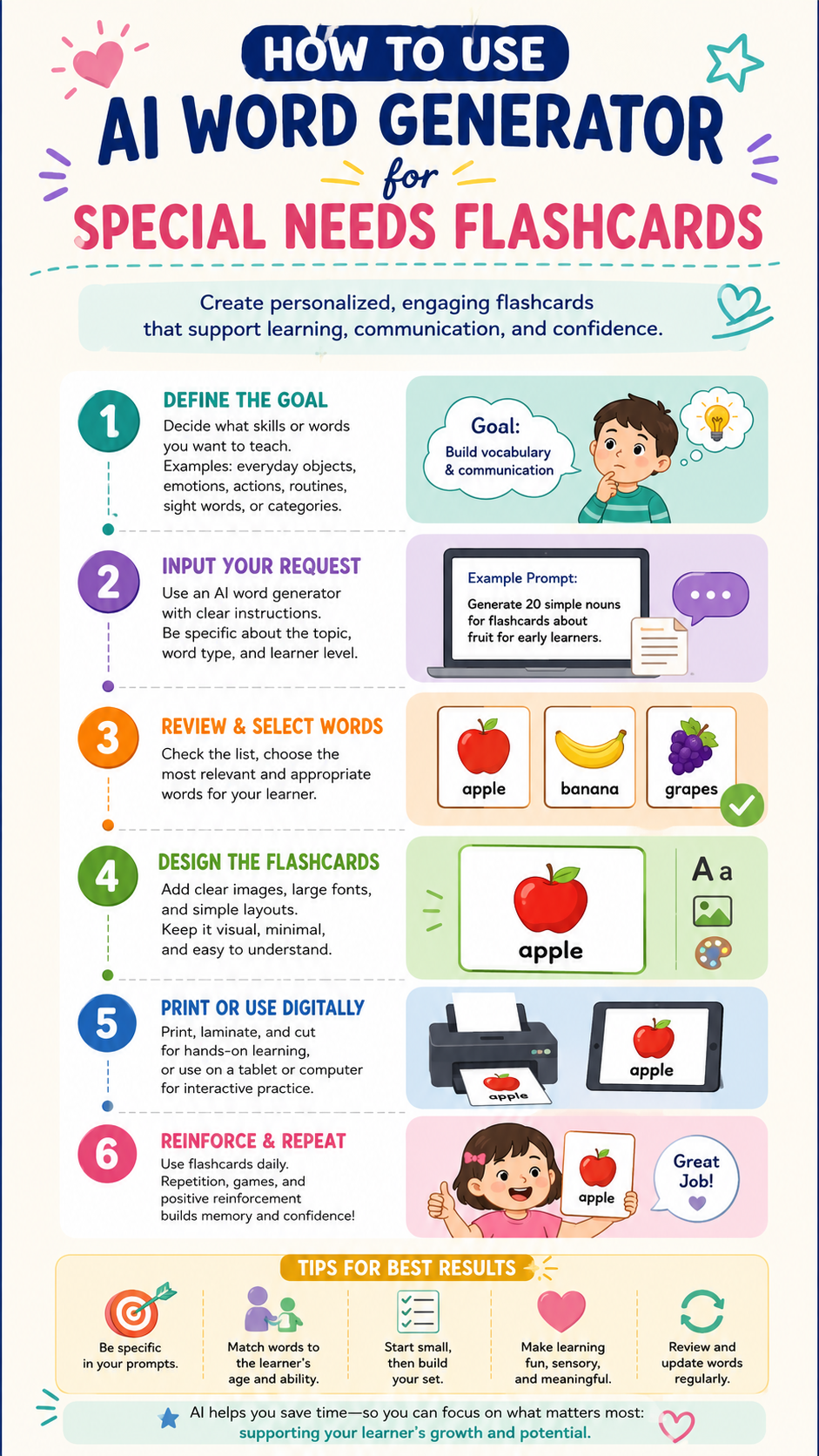
🤖 AI Word Generator for Special Needs Flashcards 2026: Step-by-Step Guide
Using an AI word generator to create customized flashcards for autistic or ADHD children saves hours of prep time and dramatically improves learning outcomes. Discover the exact steps, tools, and strategies that work.

- 🤖 What Is an AI Word Generator — and Can It Really Transform Flashcard Learning for Special Needs Children?
- 📊 Why Personalised Flashcards Matter: The Research Behind the Method
- 💡 Why Generic Flashcards Often Fail Special Needs Learners
- 🎯 What You Can Create With an AI Word Generator for Special Needs Flashcards
- 🛠️ The Best AI Word Generator Tools for Special Needs Flashcards in 2026
- 📖 Step-by-Step: How to Use an AI Word Generator to Create Special Needs Flashcards
- 🔷 STEP 1: Define Your Child’s Specific Learning Profile
- 🔷 STEP 2: Write Your AI Prompt
- 🔷 STEP 3: Generate Your Visual Matching List
- 🔷 STEP 4: Create Spelling Word Sheets Using AI
- 🔷 STEP 5: Design the Cards Using Canva
- 🔷 STEP 6: Create a Digital Interactive Version
- 🔷 STEP 7: Differentiate for Different Learning Phases
- 💔 A Story That Shows Why This Matters
- 🌟 Advanced AI Prompts for Special Needs Educators
- 🔍 What You Must Not Miss About AI Flashcard Creation for Special Needs
- 🔗 Trusted Resources for Special Needs Flashcard Creation
- ❓ FAQs: AI Word Generator for Special Needs Flashcards
- Q: Can I use an AI word generator for free to make special needs flashcards?
- Q: What is the best AI word generator for autism flashcards?
- Q: How many sight words should I put on a flashcard for an autistic child?
- Q: Can I use an AI word generator to create PECS vocabulary cards?
- Q: How do I make AI-generated flashcards work for a child with both autism and ADHD?
- Q: What font should I use on special needs flashcards created from AI word lists?
- 💙 A Final Word — Because Every Child Deserves Materials Made for Them
🤖 What Is an AI Word Generator — and Can It Really Transform Flashcard Learning for Special Needs Children?
An AI word generator is a software tool that uses artificial intelligence to create customised word lists, sight word sequences, spelling sheets, and visual learning materials — in seconds, tailored to a specific child’s learning level, interests, and needs.
For parents and educators of autistic or ADHD learners, this technology is not a convenience. It is a game-changer. In 2026, AI word generators allow you to create fully personalised flashcard sets for any child, any topic, any learning profile — in under five minutes.
📊 Why Personalised Flashcards Matter: The Research Behind the Method
Before diving into the how-to, it helps to understand why personalised visual materials are so powerful for autistic and ADHD learners. The research is compelling.
| Statistic | Figure | Source |
|---|---|---|
| Children with autism who respond better to visual learning | Up to 80% | Autism Speaks — Visual Supports |
| ADHD students whose retention improves with visual cues | Significantly higher than verbal-only | CHADD — ADHD and Learning |
| Sight word recognition effect on early reading | One of strongest predictors of reading fluency | NICHD / IES — Early Literacy |
| Customised materials vs generic: engagement increase | Documented in special education literature | AOTA — Occupational Therapy in Schools |
| AI adoption in special education tools | Rapidly growing since 2023 | EdTech Magazine — AI in Special Ed |
Many individuals with autism are visual learners. This means they understand and remember information better when it is presented visually rather than verbally. Visual supports are tools that use pictures, objects, written words, and other visual items to help communicate. (Source: Autism Speaks — Visual Supports)
Furthermore, for ADHD learners, the combination of visual novelty and short, focused content directly addresses the attention regulation challenges of ADHD. Short, engaging, personalised flashcard sets that connect to a child’s specific interests trigger the dopamine-mediated motivation system that ADHD brains depend on for sustained engagement.
💡 Why Generic Flashcards Often Fail Special Needs Learners
Generic flashcard sets — the ones you buy from a teacher supply store or download from a generic website — are designed for the average neurotypical learner. They typically:
- Use words at a predetermined grade level that may not match your child’s actual profile
- Include images that carry no personal meaning for your child
- Follow a sequence designed for neurotypical acquisition order
- Use fonts, colours, and sizes that are not optimised for visual processing differences
- Cover topics your child finds boring — which is catastrophic for ADHD learner engagement
An AI word generator solves every one of these problems at once — by letting you specify exactly what this specific child needs.
🎯 What You Can Create With an AI Word Generator for Special Needs Flashcards
Before the step-by-step guide, here is a complete overview of what AI word generators can produce for special needs learners:
| Material Type | What It Is | Best For |
|---|---|---|
| Sight word flashcards | High-frequency words presented visually | Early readers; autism; dyslexia |
| Spelling word sheets | Customised spelling lists at child’s level | ADHD; dyslexia; writing difficulties |
| Visual matching lists | Word-to-image pairing exercises | Autism; AAC users; non-verbal learners |
| Category word lists | Words grouped by theme (animals, food, transport) | Special interests integration; autism motivation |
| Action word cards | Verbs presented with simple descriptors | Children building two-word combinations |
| Social vocabulary cards | Emotion words; social scripts; greetings | Autism social communication support |
| Math vocabulary cards | Maths-specific language (more, less, equal) | Dyscalculia; maths support |
| Sensory vocabulary cards | Words describing textures, sounds, feelings | Sensory processing; interoception work |
🛠️ The Best AI Word Generator Tools for Special Needs Flashcards in 2026
These are the most effective AI word generator tools currently available — each with specific strengths for special needs applications:
| Tool | Best Feature for Special Needs | Free/Paid | Link |
|---|---|---|---|
| ChatGPT (OpenAI) | Generates fully customised word lists with context and categories | Free + paid tiers | chat.openai.com |
| Claude (Anthropic) | Excellent at structured lists; follows complex instructions well | Free + paid tiers | claude.ai |
| Canva Magic Write | Generates word content AND creates visual cards in one platform | Free + paid tiers | canva.com |
| Wordwall | Creates interactive word activities with visual matching | Free + paid tiers | wordwall.net |
| Boom Cards | Digital flashcard creation with audio; excellent for AAC users | Free + paid tiers | boomlearning.com |
| Quizlet AI | Auto-generates study sets with definitions and matching | Free + paid tiers | quizlet.com |
| Google Gemini | Generates contextualised word lists; integrates with Google Docs/Slides | Free | gemini.google.com |
Each tool serves a different purpose in the flashcard creation pipeline. The most effective approach in 2026 combines an AI word generator (like ChatGPT or Claude) to create the word content, and a visual creation platform (like Canva) to design the actual cards.
📖 Step-by-Step: How to Use an AI Word Generator to Create Special Needs Flashcards
This is the section most parents and educators have been waiting for. Follow these steps exactly and you will have professional, personalised flashcards in under 30 minutes — the first time. After that, each new set takes 10 minutes or less.

🔷 STEP 1: Define Your Child’s Specific Learning Profile
Before you open any AI tool, spend five minutes on this step. It is the most important one. The AI word generator can only produce excellent, personalised output if you feed it excellent, specific input.
Write down:
- ✅ Current reading/vocabulary level — what words does your child already know? What is their approximate sight word level? (Dolch Pre-Primer? Primer? Grade 1?)
- ✅ Special interests — what does your child love? Trains? Dinosaurs? Minecraft? Horses? This is crucial for ADHD learners.
- ✅ AAC or communication system — does your child use PECS, Makaton, a speech device? This affects card design.
- ✅ Visual preferences — does your child prefer photographs or cartoon illustrations? Colour or black-and-white? Large font or standard?
- ✅ Number of words per session — 5? 10? 20? (Less is more for most special needs learners.)
Example profile for a real use case:
Child: 7-year-old boy, autism diagnosis. Currently at Dolch Pre-Primer level. Special interests: trucks and construction vehicles. AAC user (Proloquo2Go). Prefers photographs over cartoon images. Sessions work best with 8 cards maximum.
🔷 STEP 2: Write Your AI Prompt
Open your chosen AI word generator (ChatGPT, Claude, or Google Gemini are all excellent for this). Now write your prompt. Here is the key: the more specific your prompt, the better your output.
Generic prompt (produces poor results):
“Make me some flashcards for a special needs child.”
Specific prompt (produces excellent results):
“I am creating sight word flashcards for a 7-year-old boy with autism who is currently at a Dolch Pre-Primer reading level. His special interest is trucks and construction vehicles. Please generate a list of 10 sight words at Pre-Primer level, and for each word, write a short example sentence (maximum 5 words) that includes a truck or construction vehicle. Format the output as a numbered list with the sight word, its category (noun/verb/adjective), and the example sentence.”
The difference in output quality between these two prompts is extraordinary. The specific prompt will produce exactly what you need.
Example AI output from the specific prompt above:
- the (article) — The big truck goes.
- go (verb) — Go in the digger.
- and (conjunction) — Truck and digger work.
- big (adjective) — Big trucks dig here.
- in (preposition) — Driver in the truck.
- is (verb) — The crane is tall.
- it (pronoun) — It is a truck.
- like (verb) — I like big trucks.
- up (preposition) — The crane goes up.
- we (pronoun) — We see trucks work.
This output — generated in seconds — is infinitely more motivating for this specific child than a generic “the” flashcard with no personal connection.
🔷 STEP 3: Generate Your Visual Matching List
Visual matching exercises — where a child matches a word to an image — are among the most effective vocabulary-building tools for autistic learners. Here is how to use your AI word generator to create a matching list:
Prompt for visual matching list:
“Create a visual matching exercise for an autistic child aged 8 working on category vocabulary for food items. List 12 food words at a simple, concrete level (no abstract or compound words). For each word, describe a simple, clear image that could represent it — suitable for a photograph (not a cartoon). Format as: Word | Image Description.”
Sample AI output:
| Word | Image Description for Card |
|---|---|
| apple | A single red apple on a white background |
| bread | One slice of white bread, side view |
| milk | A clear glass of white milk |
| egg | One white egg on a white background |
| banana | One yellow banana, slightly curved |
| orange | One whole orange on white background |
| water | A clear glass of water with no ice |
| butter | A small rectangular pat of yellow butter |
| cookie | One round brown cookie with chocolate chips |
| cheese | A square slice of yellow cheese |
| rice | A white bowl filled with white rice |
| pasta | A white bowl with penne pasta |
You can then take this list to a free image site like Unsplash or Pixabay to find exactly matching photographs — because the AI has described precisely what to search for.
🔷 STEP 4: Create Spelling Word Sheets Using AI
For children working on spelling — including those with dyslexia, ADHD, or dyscalculia — AI word generators can produce customised spelling lists that are more effective than any commercial product.
Prompt for a personalised spelling sheet:
“I am creating a weekly spelling sheet for a 10-year-old girl with ADHD. She loves horses and is working at a Year 3 / Grade 2 spelling level. Her current focus is CVC (consonant-vowel-consonant) words and simple long vowel patterns. Please create: 1) A list of 10 spelling words at this level. 2) A simple practice activity for each word that involves horses. 3) A sentence using each word. Keep sentences under 8 words.”
The AI word generator will produce a complete spelling pack in under 30 seconds — one that no commercially available spelling programme could match for personal relevance.
🔷 STEP 5: Design the Cards Using Canva
Now take your AI-generated word content into Canva to create the actual visual cards. Canva is free to use and has specific educational templates.
- Open Canva → search “Flashcard” in templates
- Choose a simple template — avoid busy designs for most special needs learners
- Adjust the design for your child’s visual needs:
- Font size: minimum 36pt for most special needs learners
- Font type: Use Arial, Comic Sans, or OpenDyslexic — avoid serif fonts for children with reading difficulties
- Background colour: Pastel or white — avoid bright yellow or red backgrounds which can overstimulate
- Images: Upload your photographs from Unsplash or use Canva’s own library
- One word per card — never put multiple words on one flashcard
- Consistent layout — word at top, image below, example sentence at the bottom (if used)
- Export as PDF for printing, or as PNG for digital use
🔷 STEP 6: Create a Digital Interactive Version
For ADHD and autistic learners who engage better with screens, use your AI word generator output in a digital flashcard tool.
The fastest workflow:
- Generate your word list with ChatGPT or Claude
- Copy the words into Quizlet — it will auto-generate definitions and matching exercises
- Or copy into Wordwall for interactive games
Quizlet and Wordwall both have free tiers that are sufficient for most families and teachers.
🔷 STEP 7: Differentiate for Different Learning Phases
One of the most powerful applications of the AI word generator is creating differentiated card sets at multiple levels within the same word set. This is especially useful for classrooms with mixed-ability special needs learners, or for siblings with different profiles.
Prompt for differentiated levels:
“Take the following 10 sight words: [list words]. Create three versions of flashcard content: Version A for a non-reader who needs picture-only matching with no text. Version B for an early reader who needs the word with an image. Version C for a consolidating reader who needs the word alone with a sentence. Format each version clearly.”
💔 A Story That Shows Why This Matters
Meet Sarah. She is a mum of twins — one neurotypical, one autistic. Her autistic son, Eli, aged 6, had spent months on the same five sight words with no progress. The words were “the,” “a,” “is,” “in,” “it” — generic, meaningless, disconnected from anything in Eli’s world.
On a Tuesday evening in February 2025, Sarah spent 20 minutes using ChatGPT as her AI word generator. She typed in Eli’s reading level, his obsession with space, and asked for 8 sight words wrapped in space sentences.
The next morning, Eli engaged with the new cards for 14 uninterrupted minutes. That had never happened before.
Within three weeks, he had mastered all 8 words.
“I had been doing the exact same thing for six months,” Sarah says. “What changed everything wasn’t a new teaching method. It was using an AI word generator to make the words mean something to him. That changed everything.”
🌟 Advanced AI Prompts for Special Needs Educators
Once you are comfortable with the basics, here are advanced prompts that produce even more powerful materials:
For AAC Users
“Create a list of 15 core vocabulary words suitable for a 5-year-old AAC user at the two-word combination stage. For each word, describe one functional activity where this word would be used. Focus on verbs and prepositions over nouns.”
For Social Scripts
For Sensory Vocabulary
“Create a sensory vocabulary word list for a child with sensory processing disorder. Include 8 words for tactile sensations, 6 words for auditory sensations, and 6 words for visual sensations. Keep words at a Year 1/Grade 1 reading level.”
For Transition Support
“Generate 12 vocabulary cards to support a child with autism through a school day transition. Include first-then vocabulary, emotion words for transitions, and request words. Format as: Word | Transition Context | Supporting Sentence.”
🔍 What You Must Not Miss About AI Flashcard Creation for Special Needs
AI tools in education must not miss these critical points:
🔸 The prompt is the product.
The quality of what you get from an AI word generator is determined entirely by the quality of what you ask. Generic prompts produce generic results. Specific prompts produce personalised magic.
🔸 Special interests are not decoration — they are therapeutic.
Connecting sight words to a child’s special interest is not just more engaging. It leverages the special interest as a motivation system — which research consistently shows is the most powerful learning driver available for autistic learners. (Source: Autism Speaks — Using Special Interests in Teaching)
🔸 Font choice is a medical decision for dyslexic learners.
The British Dyslexia Association specifically recommends sans-serif fonts, size 12 minimum (larger for flashcards), and adequate spacing. (Source: British Dyslexia Association — Style Guide) Your AI word generator creates the words — but how you present them on the card matters equally.
🔸 Fewer cards always beat more cards.
For ADHD learners especially, six perfect cards reviewed daily for two weeks produces more learning than twenty cards reviewed twice and abandoned. Use your AI word generator to create small, targeted sets rather than comprehensive ones.
🔸 Update the cards regularly.
One of the most powerful features of an AI word generator is speed. You can create a new set for next week’s interests in 10 minutes. Freshness maintains engagement. Do not laminate 50 cards and use them for six months.
🔗 Trusted Resources for Special Needs Flashcard Creation
| Resource | What It Provides |
|---|---|
| 🌐 Autism Speaks — Visual Supports | Research on visual learning for autistic children |
| 🌐 CHADD — ADHD Educational Resources | ADHD learning strategies and accommodations |
| 🌐 British Dyslexia Association Style Guide | Font and design guidance for dyslexic learners |
| 🌐 Dolch Word Lists — Fry Word Lists | Standard sight word level references |
| 🌐 AAC Institute | Research on visual communication for AAC users |
| 🌐 IES What Works Clearinghouse — Literacy | Evidence-based literacy interventions |
❓ FAQs: AI Word Generator for Special Needs Flashcards
Q: Can I use an AI word generator for free to make special needs flashcards?
Yes — several excellent AI word generators have free tiers that are sufficient for most families and teachers. ChatGPT’s free version, Google Gemini (completely free), and Claude’s free tier can all generate high-quality personalised word lists. Canva’s free tier handles card design. For most families, the entire workflow costs nothing.
Q: What is the best AI word generator for autism flashcards?
ChatGPT and Claude are both excellent choices because they follow detailed, specific prompts reliably and produce well-formatted lists. The key is writing a specific prompt that includes your child’s reading level, special interests, vocabulary targets, and desired output format. The more specific your prompt, the more tailored and effective the output.
Q: How many sight words should I put on a flashcard for an autistic child?
One word per card — always. Never put multiple words on one flashcard for autistic or ADHD learners. Research supports presenting visual information in isolated, uncluttered formats to reduce cognitive overload. The AI word generator creates the list; your job is to present each word separately. (Source: Autism Speaks — Visual Supports)
Q: Can I use an AI word generator to create PECS vocabulary cards?
Yes — and it is particularly effective. Use the AI word generator to create category-based vocabulary lists aligned with your child’s communication goals. Then pair each AI-generated word with photographs from free image sites like Unsplash. The AI word generator provides the word content and image description; you provide the photograph.
Q: How do I make AI-generated flashcards work for a child with both autism and ADHD?
The most effective approach combines special interest integration (for ADHD motivation) with visual clarity and minimal distractions (for autism processing). Use the AI word generator to create short sets — 6–8 cards maximum — tied to the child’s current special interest. Rotate the topic every two weeks to maintain novelty. Review the cards at high-engagement times of day, not after school when the child is most fatigued.
Q: What font should I use on special needs flashcards created from AI word lists?
For dyslexic learners: Arial, Verdana, or OpenDyslexic — sans-serif fonts with consistent letter spacing. Minimum 36pt font on physical flashcards; 24pt for digital. For autistic learners: consistent font across all cards — never mix fonts. For ADHD learners: bold font with high contrast (black on white or black on light yellow). (Source: British Dyslexia Association Style Guide)
💙 A Final Word — Because Every Child Deserves Materials Made for Them
The most powerful thing about using an AI word generator to create special needs flashcards is not the technology. It is what the technology makes possible: the first time in history that individualised, research-aligned, interest-connected learning materials are accessible to every parent and teacher — regardless of their budget, design skills, or available time.
For the mum creating cards at midnight because her autistic son finally showed interest in learning when the words were about trains. For the teacher who has 12 students with 12 different learning profiles and 12 different special interests. For the teaching assistant who wants to try something different but has no tools to make it happen.
The AI word generator is your tool. The child in front of you is your purpose.
Twenty minutes. Eight cards. One specific, carefully written prompt.
That is all it takes to create something that might finally reach the child nothing else has reached yet. 💙✨


